How it works
Two devices, one puck, endless reps
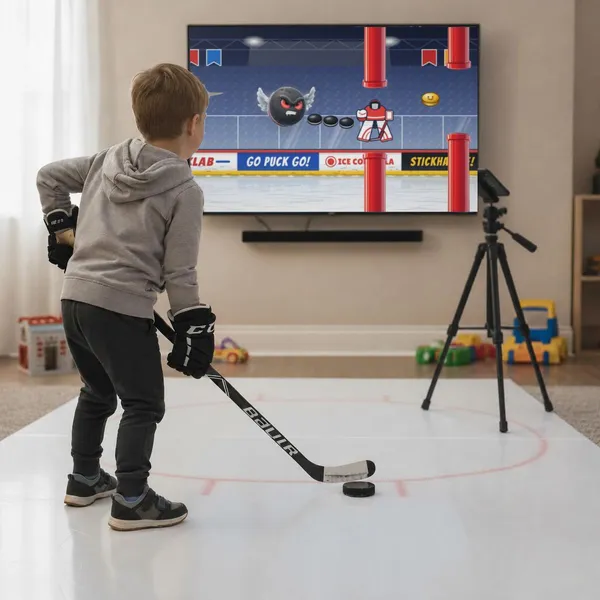
PuckLab watches a real puck with a phone's camera and turns your stickhandling into game controls, live, on any screen.
- RecorderA phone on a tripodAngled down at your puck. It tracks the puck many times a second.
- YouStickhandle on a tileSynthetic ice, a dryland tile or a smooth floor. A real puck or a ball.
- DisplayThe game on any screenA TV, tablet or second phone, paired over your home Wi-Fi.
What you need
- Two devices · Android or iOS phone/tablet as the Recorder, and a TV, tablet or phone as the Display
- A tripod with a phone clamp · about chest height
- A surface · synthetic ice or dryland tile, or a smooth floor
- A stick, and a puck or ball · any puck, green puck, Xenopuck, tennis ball, golf ball or hockey ball can be used!
- A charger for the Recorder · tracking uses plenty of battery
Setting up, step by step
- Step 1: Install PuckLab on bothCreate an account and a player profile on the Display.
- Step 2: Pair themSame Wi-Fi. Enter the PIN the Display shows.
- Step 3: Aim the RecorderSet the tripod at least 4 ft (1.2 m) tall, with the camera pointed down at the puck. Plenty of light works best.
- Step 4: Stickhandle to startMoving the puck fills the start ring. Game on.